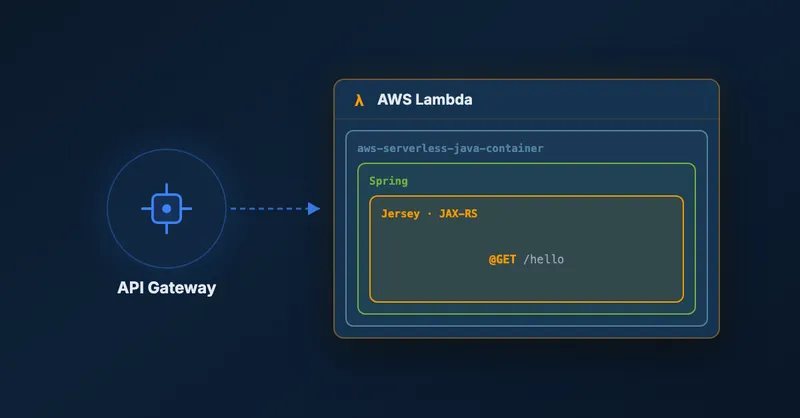
AWS Lambda is actually made to be used by implementing small functions which can be started quickly. So your code artifact should be as small as possible for a fast startup time. However, in the Java world there are nice frameworks like Jersey and Spring which can help you writing code for an API a lot! Unfortunately these frameworks can take up to a few MB and blow up your artifact, but you might have your reasons to use them in AWS Lambda, e.g. because you’re migrating an existing project to AWS Lambda. So let’s see, how you can use Jersey and Spring together in AWS Lambda! The code can be found in my GitHub repository lambda-jersey-spring-example.
A good starting point is the aws-serverless-java-container project on GitHub. It provides Maven modules to support Jersey, Spring and Spark framework. Nice, so let’s get started and include the relevant Maven dependencies:
<dependency>
    <groupId>com.amazonaws</groupId>
    <artifactId>aws-lambda-java-core</artifactId>
    <version>1.1.0</version>
</dependency>
<dependency>
    <groupId>com.amazonaws</groupId>
    <artifactId>aws-lambda-java-log4j</artifactId>
    <version>1.0.0</version>
</dependency>
<dependency>
    <groupId>com.amazonaws.serverless</groupId>
    <artifactId>aws-serverless-java-container-jersey</artifactId>
    <version>0.7</version>
</dependency>
<dependency>
    <groupId>com.amazonaws.serverless</groupId>
    <artifactId>aws-serverless-java-container-spring</artifactId>
    <version>0.7</version>
</dependency>
(As you can see, this also includes the dependencies to write AWS Lambda functions in Java)
Add a Request Handler
The next step is to add a Lambda function using RequestHandler interface of aws-lambda-java-core from aws-lambda-java-libs on GitHub.
package de.sebastianhesse.aws.examples;

import com.amazonaws.serverless.proxy.internal.model.AwsProxyRequest;
import com.amazonaws.serverless.proxy.internal.model.AwsProxyResponse;
import com.amazonaws.serverless.proxy.jersey.JerseyLambdaContainerHandler;
import com.amazonaws.services.lambda.runtime.Context;
import com.amazonaws.services.lambda.runtime.RequestHandler;
import org.springframework.web.context.support.AnnotationConfigWebApplicationContext;

/**
 * A request handler loading a Spring context and using spring supported Jersey resources.
 **/
public class JerseySpringHandler implements RequestHandler<AwsProxyRequest, AwsProxyResponse> {

    private JerseyLambdaContainerHandler<AwsProxyRequest, AwsProxyResponse> handler;

    public JerseySpringHandler() {
        // create Spring context
        AnnotationConfigWebApplicationContext context = new AnnotationConfigWebApplicationContext();
        context.register(SpringConfig.class);
        context.refresh();

        // use Spring bean of JerseyResourceConfig to have spring supported resources
        JerseyResourceConfig resourceConfig = context.getBean(JerseyResourceConfig.class);
        handler = JerseyLambdaContainerHandler.getAwsProxyHandler(resourceConfig);
    }

    public AwsProxyResponse handleRequest(AwsProxyRequest awsProxyRequest, Context context) {
        return handler.proxy(awsProxyRequest, context);
    }

}
This is the most important part where Jersey and Spring are glued together. So, what’s done here? There are three simple things:
- A Spring context is created using an annotation based config.
- A bean of a custom Jersey configuration class
JerseyResourceConfigis retrieved from the Spring context. The class registers the actual Jersey resources (see below) which are also available in the Spring context. - The Jersey configuration bean is used to handle all incoming requests.
Configure Jersey and Spring
Now, let’s take a look at the JerseyResourceConfig and how the resources are registered:
package de.sebastianhesse.aws.examples;

import de.sebastianhesse.aws.examples.jersey.TestOneResource;
import de.sebastianhesse.aws.examples.jersey.TestTwoResource;
import org.glassfish.jersey.server.ResourceConfig;
import org.springframework.beans.factory.annotation.Autowired;
import org.springframework.stereotype.Component;

import javax.annotation.PostConstruct;

/**
 * A Jersey config (registered as a Spring bean) which puts the Spring context into the properties.
 */
@Component
public class JerseyResourceConfig extends ResourceConfig {

    @Autowired TestOneResource oneResource;
    @Autowired TestTwoResource twoResource;

    @PostConstruct
    public void init() {
        // register spring supported resources
        register(oneResource);
        register(twoResource);
    }
}
Quite simple, isn’t it? Ok, so the following snippets show the code for a simple Spring annotation config and one of the sample Jersey resources.
package de.sebastianhesse.aws.examples;

import org.springframework.context.annotation.ComponentScan;
import org.springframework.context.annotation.Configuration;

/**
 * Annotation based Spring configuration.
 */
@Configuration
@ComponentScan("de.sebastianhesse.aws.examples")
public class SpringConfig {

}

package de.sebastianhesse.aws.examples.jersey;

import de.sebastianhesse.aws.examples.DefaultService;
import org.springframework.beans.factory.annotation.Autowired;
import org.springframework.stereotype.Service;

import javax.ws.rs.GET;
import javax.ws.rs.Path;
import javax.ws.rs.Produces;
import javax.ws.rs.core.MediaType;
import javax.ws.rs.core.Response;

/**
 * A simple Jersey resource using Spring.
 */
@Path("/one")
@Service
public class TestOneResource {

    @Autowired DefaultService service;

    @GET
    @Produces(MediaType.TEXT\_PLAIN)
    public Response simpleGet() {
        return Response.ok("Resource Number One: " + service.getFoo()).build();
    }

}
Nothing special here as you can see. It’s just using another DefaultService to prove that autowiring a bean works as expected.
Automate The Steps Using CloudFormation
In order to complete the example, the following listing shows you a sample YAML CloudFormation configuration for the Lambda function.
AWSTemplateFormatVersion: '2010-09-09'
Transform: AWS::Serverless-2016-10-31
Description: Example about how to use Jersey and Spring together in AWS Lambda.

Resources:
  JerseySpringHandler:
    Type: AWS::Serverless::Function
    Properties:
      Handler: de.sebastianhesse.aws.examples.JerseySpringHandler
      Runtime: java8
      MemorySize: 320
      Timeout: 60
      CodeUri: target/lambda-jersey-spring-example-1.0.0.jar
      Policies: AWSLambdaBasicExecutionRole
      Events:
        JerseySpringProxy:
          Type: Api
          Properties:
            Path: /{proxy+}
            Method: any
Please consider that in case you’re using another Api path for your Lambda function, e.g. /api/{proxy+}, you must call handler.setBasePath("/api") in JerseySpringHandler so that the path matching will work for Jersey. Another point worth noting is that such a simple example is using about 12 MB for the target JAR file. This is huge compared to what you get when accomplishing the same using Node.js, so use these frameworks with care! In my opinion you don’t need Spring or Jersey if you’re developing a Lambda function. But I understand the desire to use it 😀
That’s it! You’re done and can add more Jersey resources if you have to. If you are interested in more AWS Lambda content, please take a look at other examples about AWS Lambda and my top 5 tips on writing a Lambda function.

Related Articles

Using Spring Boot On AWS Lambda: Clever or Dumb?
Should you run Spring Boot on AWS Lambda? Detailed analysis of advantages, disadvantages, cold start impact, and GraalVM alternatives for Java serverless functions.
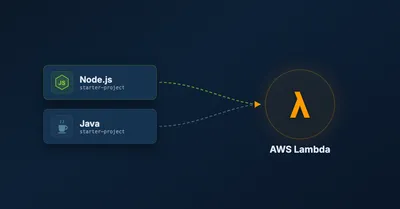
Starter Projects For AWS Lambda Using NodeJS And Java
AWS Lambda starter projects for NodeJS and Java with CloudFormation templates. Get boilerplate code to quickly deploy Lambda functions with API Gateway integration.
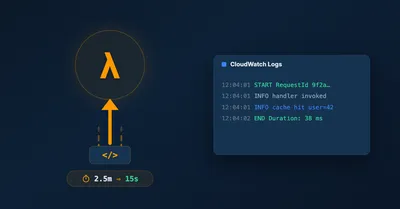
Fast AWS Lambda Code Updates And Improved Lambda Logs
Speed up AWS Lambda code updates from 2.5 minutes to 15 seconds with lambda-updater. Plus, easily trace logs across multiple Lambda functions using lambdalogs tool.
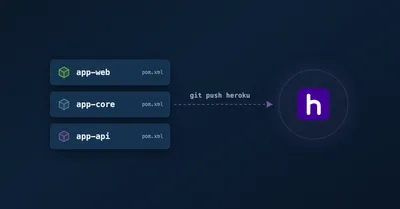
Deploy a Multi-Module Maven Project to Heroku
Deploy multi-module Maven projects to Heroku with Spring Boot. Use config variables and Procfile to manage multiple microservices from a single repository.