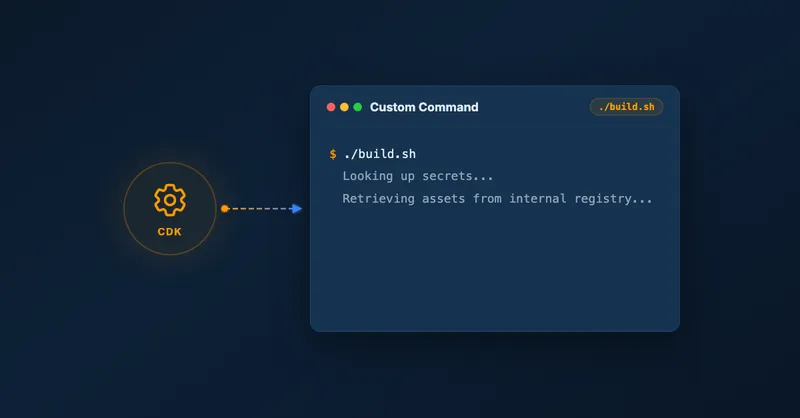
Run Custom Build Commands During CDK Synthesis with Code.fromCustomCommand
Have you ever needed to build a Rust or Go Lambda function directly inside your CDK stack? Or download a pre-built artifact from S3 during deployment? CDK’s built-in constructs like NodejsFunction or Code.fromAsset don’t always cover non-JavaScript runtimes or custom build pipelines. That’s where Code.fromCustomCommand comes in.
What Is Code.fromCustomCommand?
Code.fromCustomCommand is a flexible escape hatch for Lambda packaging. It lets you run any shell command during CDK synthesis to produce a Lambda deployment artifact:
lambda.Code.fromCustomCommand(
  path.join(__dirname, '..', 'dist', 'lambda'),
  ['bash', 'scripts/build.sh', 'dist/lambda'],
  { commandOptions: { stdio: 'inherit' } }
)
The signature is Code.fromCustomCommand(outputDir, command, options):
outputDir— the directory CDK zips and stages to S3 as your Lambda codecommand— shell command (string or string array) to execute before packagingoptions— maps directly to Node’sspawnSyncoptions, so you can controlcwd,env,shell, andstdio
Under the hood, CDK calls Node’s spawnSync synchronously, then zips outputDir and stages it as a Lambda asset for upload.
When Does It Run?
The command executes during CDK synthesis — every time you run cdk synth, cdk diff, or cdk deploy. It also runs during npm test when your tests synthesize stacks via Template.fromStack().
It does not run during npm run build (TypeScript compilation only).
Primary Use Cases
Custom Build Toolchains
If you’re writing Lambda functions in Rust, Go, or any language with a native build step, you can invoke the toolchain directly:
// Build a Rust Lambda function
lambda.Code.fromCustomCommand(
  path.join(__dirname, '..', 'target', 'lambda', 'my-function'),
  ['cargo', 'lambda', 'build', '--release'],
  { commandOptions: { cwd: path.join(__dirname, '..'), stdio: 'inherit' } }
)
This keeps your build process inside CDK without needing separate CI steps or pre-built artifacts checked into source control.
External Artifact Retrieval
Need to download a pre-built binary from S3 or a package registry? Run the download during synthesis:
lambda.Code.fromCustomCommand(
  path.join(__dirname, 'dist'),
  ['aws', 's3', 'cp', 's3://my-artifacts/my-function.zip', 'dist/'],
  { commandOptions: { stdio: 'inherit' } }
)
Synth-Time Side Effects
You can even point outputDir at a stub directory and use the command purely for side effects — generating config files, validating external dependencies, or populating local caches.
Critical Behaviors to Know
Before reaching for Code.fromCustomCommand, keep these in mind:
No built-in caching. The command runs on every synthesis, every time. A slow build or network download will slow down every cdk diff and cdk deploy. Implement your own up-to-date checks in the script if performance matters.
Fatal on failure. A non-zero exit code immediately aborts synthesis. Make sure your script exits cleanly on success and fails loudly on real errors.
Blocking. Synthesis pauses completely while your command runs. There’s no parallelism here — everything waits.
A Practical Pattern
Since the command runs on every synthesis, a common pattern is to guard the expensive work with an up-to-date check in the build script:
#!/bin/bash
# scripts/build.sh
set -e

OUTPUT_DIR="$1"

# Skip rebuild if output is already up to date
if [ -d "$OUTPUT_DIR" ] && [ "$OUTPUT_DIR" -nt "src/" ]; then
  echo "Output up to date, skipping build"
  exit 0
fi

cargo lambda build --release --output-location "$OUTPUT_DIR"
Then in your CDK stack:
const code = lambda.Code.fromCustomCommand(
  path.join(__dirname, '..', 'dist', 'my-function'),
  ['bash', 'scripts/build.sh', 'dist/my-function'],
  { commandOptions: { stdio: 'inherit' } }
);

new lambda.Function(this, 'MyFunction', {
  runtime: lambda.Runtime.PROVIDED_AL2023,
  handler: 'bootstrap',
  code,
});
You can find a complete working example in the GitHub repository.
When Not to Use It
If you’re writing Node.js Lambda functions, stick with NodejsFunction — it handles bundling, tree-shaking, and esbuild configuration automatically. For Python, PythonFunction from @aws-cdk/aws-lambda-python-alpha covers most scenarios.
Code.fromCustomCommand shines when you have a toolchain or workflow that CDK’s built-in constructs simply can’t accommodate.
Conclusion
Code.fromCustomCommand fills an important gap in CDK’s Lambda packaging story. If you need to invoke custom toolchains, pull artifacts from external sources, or run synth-time scripts, it gives you a clean, native integration point without stepping outside of CDK. Just build in your own caching logic to keep synthesis fast.
For a broader look at your Lambda packaging options in CDK, check out my post on 5 ways to bundle a Lambda function within a CDK construct.
Have you tried it with an unusual runtime or build pipeline? Reach out on LinkedIn — I’d love to hear what you’re building.

Related Articles
Scale CloudWatch Alarms with Metrics Insights Queries
Use CloudWatch Metrics Insights to monitor multiple resources by querying their tags.
Serve Markdown for LLMs and AI Agents Using Amazon CloudFront
Learn how to serve Markdown to LLM and AI agent clients while keeping HTML for human visitors, using CloudFront Functions, Lambda, and S3 — the AWS equivalent of Cloudflare's 'Markdown for Agents' feature.
5 Ways To Bundle a Lambda Function Within an AWS CDK Construct
5 ways to bundle Lambda functions in CDK constructs: inline code, separate files, pre-build bundling, NodejsFunction, and Serverless App Repository integration.

Using Spring Boot On AWS Lambda: Clever or Dumb?
Should you run Spring Boot on AWS Lambda? Detailed analysis of advantages, disadvantages, cold start impact, and GraalVM alternatives for Java serverless functions.