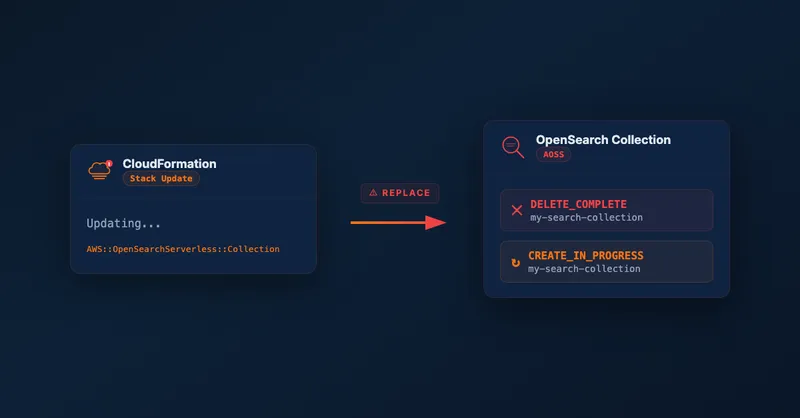
Updating Tags on an OpenSearch Serverless Collection Replaces the Resource
Let’s play a game. Which CloudFormation resource requires a full replacement when you update its tags?
Tags. Not the resource name. Not some critical identifier. Tags.
If you answered AWS::OpenSearchServerless::Collection, congratulations — you’ve probably been burned by this. Everyone
tells you to tag your resources. So you do, and CloudFormation responds by deleting and recreating your entire search
collection.
The Surprise
Most AWS resources handle tag updates gracefully. CloudFormation updates the tags in-place with no interruption — it’s usually the safest kind of change you can make.
AWS::OpenSearchServerless::Collection does not work this way. If you check
the CloudFormation documentation,
you’ll find that updating Tags requires replacement. And in fact, almost every property on this resource requires
replacement — Description is the only one that doesn’t:
| Property | Update Behavior |
|---|---|
Name | Replacement |
Type | Replacement |
Tags | Replacement |
EncryptionConfig | Replacement |
StandbyReplicas | Replacement |
Description | No interruption |
So if you add a tag after your collection is already deployed, CloudFormation will attempt to replace the resource. And if you named the collection explicitly, you’ll hit this error:
CloudFormation cannot update a stack when a custom-named resource requires replacing.
Rename <resource-id> and update the stack again.
This error appears because CloudFormation can’t delete the old collection (with your current name) and create a new one with the same name at the same time. The workaround involves renaming the resource in your template, deploying, and then renaming it back — a multi-step process that can cause downtime.
Why Replacement Hurts More Than You’d Expect
A replacement sounds manageable at first: delete the old collection, create a new one, repopulate the data. But there are several complications that make this painful in practice.
Data loss. OpenSearch Serverless is a search index, not a primary data store — but repopulating it might require a full re-index from your source of truth, which could take significant time depending on data volume.
New collection ID. Every AOSS collection gets a unique ID that’s embedded in the endpoint URL. When CloudFormation replaces the collection, you get a new ID. Any downstream systems hardcoding the old endpoint break immediately.
Policy updates required. OpenSearch Serverless access is controlled by network policies and data access policies that reference the collection by name. After replacement, these policies need updating too. In a single-account setup this is a minor inconvenience. In a cross-account setup, it’s a coordination problem across accounts and often across teams.
The cross-account case. If you’re ingesting data from another AWS account — as I described in my post on cross-account OpenSearch Serverless setup with CDK — a collection replacement has larger blast radius. The network policy in the search account references the VPC endpoint from the ingestion account. The data access policy grants permissions to a specific IAM role. The ingestion Lambda has the collection ID baked into its environment variables. Replacing the collection means coordinating updates across both accounts before ingestion works again. If you can’t tolerate downtime, you’re looking at a multi-step deployment: create the new collection alongside the old one, migrate ingestion to point at it, confirm everything works, then tear down the old one.
Other Resources with the Same Problem
AWS::OpenSearchServerless::Collection isn’t the only offender. AWS::MSK::ServerlessCluster has the same behavior —
updating tags requires replacement. There are likely others; I haven’t audited every CloudFormation resource type.
The pattern seems to show up on “serverless” variants of services where the underlying implementation doesn’t support in-place metadata updates. Worth checking the documentation for any serverless resource type before assuming tag updates are safe.
How to Protect Yourself
Audit update behaviors before deploying. For any new CloudFormation resource type, scan its documentation for the update behavior table. If tags require replacement, plan accordingly.
Define your tagging strategy upfront. Agree on your tag set before the first deployment and bake it into the initial resource definition. Adding tags later is what triggers the problem.
Use a deployment strategy for forced replacements. If you do need to update tags on a live collection, plan a blue/green approach: create the new collection first, migrate data and traffic, then remove the old one. Don’t rely on CloudFormation’s default replacement flow for stateful resources.
A Small Request
If you find other AWS resources that require replacement for tag updates, I’d love to hear about them. Reach out on LinkedIn — I’ll update this blog post here.
For more on the cross-account OpenSearch Serverless setup and why the deployment sequence gets complicated, see my post on setting up cross-account OpenSearch Serverless with AWS CDK.

Related Articles

Cross-Account Data Ingestion into OpenSearch Serverless with AWS CDK
How to set up OpenSearch Serverless for cross-account data ingestion using AWS CDK, VPC endpoints, and IAM role assumption — filling the gaps in AWS documentation.
Run Custom Build Commands During CDK Synthesis with Code.fromCustomCommand
Learn how to use CDK's Code.fromCustomCommand to run custom build scripts, download artifacts, or use non-standard toolchains like Rust or Go during CDK synthesis.
Scale CloudWatch Alarms with Metrics Insights Queries
Use CloudWatch Metrics Insights to monitor multiple resources by querying their tags.
Serve Markdown for LLMs and AI Agents Using Amazon CloudFront
Learn how to serve Markdown to LLM and AI agent clients while keeping HTML for human visitors, using CloudFront Functions, Lambda, and S3 — the AWS equivalent of Cloudflare's 'Markdown for Agents' feature.