Serve Markdown for LLMs and AI Agents Using Amazon CloudFront
LLMs and AI agents are increasingly browsing the web to gather information, answer questions, and complete tasks. But these clients don’t need fancy HTML layouts, stylesheets, or JavaScript. They work best with clean, structured Markdown. Cloudflare recently introduced a feature called “Markdown for Agents” that automatically serves Markdown to AI clients. But what if you’re running your infrastructure on AWS?
In this post, I’ll walk you through the concept of building the same capability using Amazon CloudFront, S3, and Lambda and the AWS CDK. The full, deployable example project is available on GitHub.
The Concept: Content Negotiation
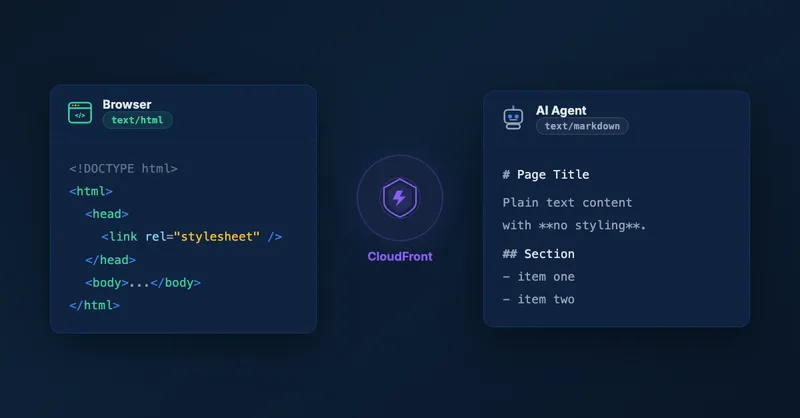
The core idea is content negotiation via the HTTP Accept header. When a client makes a request, it tells the server what content types it can handle. Browsers typically send Accept: text/html, while an LLM client usually sends Accept: text/markdown nowadays (see CloudFlare’s blog post for details).
By inspecting this header at the CDN level, we can route each request to the right version of the content:
- Human visitor (browser) sends
Accept: text/html→ receives the normal HTML page - LLM or AI agent sends
Accept: text/markdown→ receives a clean Markdown version
This is completely transparent to existing users. Browsers continue to get HTML as before. Only clients that explicitly request text/markdown receive the Markdown version.
Architecture Overview
The solution consists of two parts: request routing and content generation.
Request routing happens at the edge. A CloudFront Function inspects the Accept header on every viewer request. If the client requests text/markdown, the function rewrites the URI — for example, changing /about.html to /about.md or / to /index.md. Non-HTML file extensions like .css, .js, or .png are left untouched. If the header doesn’t contain text/markdown, the request passes through unchanged.
Content generation happens asynchronously. Whenever an HTML file is uploaded to S3, an S3 event notification triggers a Lambda function. This function reads the HTML, converts it to Markdown using the turndown library, and writes the resulting .md file back to S3 at the same path but with a different extension. So about.html automatically gets a sibling about.md. The Lambda includes a safety check to skip files that are already .md, preventing infinite trigger loops.
Why Pre-Generation?
You might wonder: why not convert HTML to Markdown on-the-fly using Lambda@Edge or CloudFront Functions?
The answer is a CloudFront limitation: neither CloudFront Functions nor Lambda@Edge can access the origin’s response body. They can only set a new body or manipulate headers and the request URI.
On-the-fly conversion is possible but requires you to load the content yourself from S3. This decreases performance and adds up to the latency.
Therefore, pre-generation turns out to be the better approach:
- Zero conversion latency at request time — the Markdown is already in S3, ready to serve
- Simpler caching — each file is a separate S3 object with its own cache entry
- No compute cost per request — conversion happens once at upload time, not on every request
Testing It
You can find all the implementation details — the CloudFront Function, the Lambda handler, and the CDK stack — in the GitHub repository. By the way, if you’re interested in how you can bundle a Lambda function within a CDK construct, check out my post on 5 ways to bundle a Lambda function within an AWS CDK construct.
After deploying the stack, you can verify the content negotiation with curl:
# HTML response (default browser behavior)
curl https://your-distribution.cloudfront.net/

# Markdown response (what an LLM client would send)
curl -H "Accept: text/markdown" https://your-distribution.cloudfront.net/
The first request returns the normal HTML page. The second returns clean Markdown.
When Is This Useful?
This pattern is valuable whenever you want AI agents to efficiently consume your web content: documentation sites, API reference pages, knowledge bases, or corporate websites. Instead of forcing LLMs to parse messy HTML and strip away navigation, ads, and scripts, you serve them exactly the structured content they need.
Conclusion
With a CloudFront Function for request routing, a Lambda function for HTML-to-Markdown conversion, and a cache policy that includes the Accept header, you can replicate Cloudflare’s “Markdown for Agents” feature entirely on AWS. The pre-generation approach keeps things simple and adds zero latency at request time.
The full CDK project is on GitHub — deploy it, try it out, and adapt it to your use case. If you’re interested in more serverless patterns on AWS, check out my introduction to serverless or best practices for developing AWS Lambda functions.

Related Articles
Run Custom Build Commands During CDK Synthesis with Code.fromCustomCommand
Learn how to use CDK's Code.fromCustomCommand to run custom build scripts, download artifacts, or use non-standard toolchains like Rust or Go during CDK synthesis.
5 Ways To Bundle a Lambda Function Within an AWS CDK Construct
5 ways to bundle Lambda functions in CDK constructs: inline code, separate files, pre-build bundling, NodejsFunction, and Serverless App Repository integration.
Updating Tags on an OpenSearch Serverless Collection Replaces the Resource
AWS::OpenSearchServerless::Collection requires replacement when you update tags — a surprising CloudFormation behavior that can break cross-account setups and cause downtime.

Cross-Account Data Ingestion into OpenSearch Serverless with AWS CDK
How to set up OpenSearch Serverless for cross-account data ingestion using AWS CDK, VPC endpoints, and IAM role assumption — filling the gaps in AWS documentation.